# Improving Code Quality Of Android Apps With SonarQube And Gradle Detekt
[Paul Knulst](https://www.paulsblog.dev/) in [Programming](https://www.paulsblog.dev/tag/programming/) • Nov 23, 2021 • 5 min read
* * *
Code quality is very important and you should always try to optimize your implementation. This article shows two tools that can be combined to achieve better quality, especially in android apps.
1\. Introduction
----------------
Some weeks ago I found a nice tutorial about SonarQube. Because I am a great fan of improving my code quality or the quality of projects I am working on I created an instance of SonarQube myself and used it to check and improve the code quality of several android apps.
The following article shows a how-to that can be executed by anybody if a running Docker Swarm exists [__(learn how to create one here)__](https://levelup.gitconnected.com/docker-swarm-in-a-nutshell-ed2a9c42cd7c)__.__
I also provide a Dockerfile for local development in the end.
2\. SonarQube
-------------
What is SonarQube?
> __SonarQube is an open-source platform developed by SonarSource for continuous inspection of code quality to perform automatic reviews with static analysis of code to detect bugs, code smells, and security vulnerabilities on 20+ programming languages.__
### 2.1. Installation
The following docker-compose.sq.yml can be used to create a SonarQube instance within a Docker Swarm
```yaml
version: "3.7"
services:
sonarqube:
image: sonarqube:latest
depends_on:
- db
networks:
- default
- traefik-public
environment:
SONAR_JDBC_URL: jdbc:postgresql://db:5432/sonarqube
SONAR_JDBC_USERNAME: sonar
SONAR_JDBC_PASSWORD: sonar
volumes:
- data:/opt/sonarqube/data
- extensions:/opt/sonarqube/extensions
- logs:/opt/sonarqube/logs
- temp:/opt/sonarqube/temp
restart: on-failure
container_name: sonarqube
deploy:
placement:
constraints:
- node.labels.sonarqube == true
labels:
- traefik.enable=true
- traefik.docker.network=traefik-public
- traefik.constraint-label=traefik-public
- traefik.http.routers.sonarqube-http.rule=Host(`sq.${PRIMARY_DOMAIN?Variable not set}`)
- traefik.http.routers.sonarqube-http.entrypoints=http
- traefik.http.routers.sonarqube-http.middlewares=https-redirect
- traefik.http.routers.sonarqube-https.rule=Host(`sq.${PRIMARY_DOMAIN?Variable not set}`)
- traefik.http.routers.sonarqube-https.entrypoints=https
- traefik.http.routers.sonarqube-https.tls=true
- traefik.http.routers.sonarqube-https.tls.certresolver=le
- traefik.http.services.sonarqube.loadbalancer.server.port=9000
- traefik.http.routers.sonarqube-https.middlewares=security-headers
db:
image: postgres
networks:
- default
environment:
POSTGRES_USER: sonar
POSTGRES_PASSWORD: sonar
POSTGRES_DB: sonarqube
volumes:
- psql:/var/lib/postgresql
- psql_data:/var/lib/postgresql/data
restart: on-failure
container_name: postgresql
deploy:
placement:
constraints:
- node.labels.sonarqube.db == true
networks:
traefik-public:
external: true
default:
external: false
volumes:
data:
extensions:
logs:
temp:
psql:
psql_data:
```
To start SonarQube the used environment variable within the docker-compose.sq.yml have to be exported:
```bash
export PRIMARY_DOMAIN=paulsblog.dev
```
Afterward, the stack can be deployed
```bash
docker stack deploy -c docker-compose.sq.yml sonarqube
```
and it will be accessible at [https://sq.knulst.de](https://sq.knulst.de/).
To run SonarQube you need to increase the memory limit with the following command.
```bash
sysctl -w vm.max_map_count=262144
```
__(In windows you have to start the WSL shell:__ `wsl.exe -d docker-desktop`__)__
### 2.2. Configuration
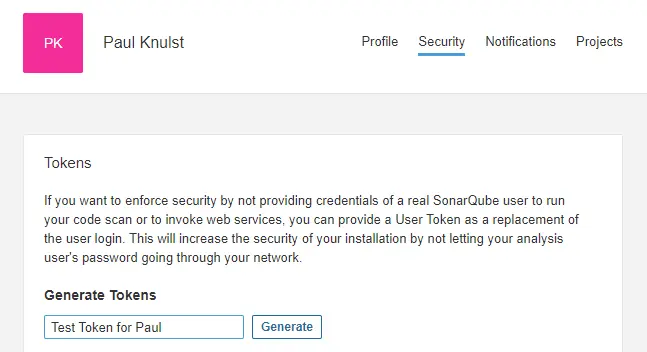
Now you can log into the web dashboard (__default user/pass = admin/admin__) and start the configuration process. To use this SonarQube instance in any android app a login token has to be created within the user profile at [https://sq.knulst.de](https://sq.knulst.de/)
| |
|:--:|
|*Generate a user token within the admin menu of SonarQube*|
After this token is created three files have to be adjusted:
1. `build.gradle`(project)
2. `build.gradle` (app)
3. `gradle.properties`
The first addition is needed within the projects `build.gradle`. It is important to add at the root level:
```gradle
plugins {
id "org.sonarqube" version "2.8"
}
```
Secondly, a new block should be created within the app `build.gradle`:
```gradle
sonarqube {
properties {
def activeFlavor = "testFlavor1"
def libraries = project.android.sdkDirectory.getPath() + "/platforms/android-28/android.jar"
property "sonar.language", "kotlin"
property "sonar.sources", "src/main/java, src/$activeFlavor/java"
property "sonar.binaries", "build/intermediates/classes/$activeFlavor/debug"
property "sonar.libraries", libraries
property "sonar.java.libraries", libraries
property "sonar.tests", "src/test/java, src/androidTest/java"
property "sonar.log.level ", "DEBUG"
property "sonar.java.test.binaries", "build/intermediates/classes/$activeFlavor/debug"
property "sonar.java.test.libraries", libraries
property "sonar.junit.reportsPath", "build/test-results/Debug"
property "sonar.android.lint.report", "build/outputs/lint-results.xml"
}
}
```
It is important to know that this block is used by an app written with Kotlin which has several flavors. To use this code block the `activeFlavor` and `sonar.sources` have to be adjusted.
Additionally, two more lines have to be inserted into the app `build.gradle`:
**1\. Add SonarQube package to dependencies:**
```gradle
implementation "org.sonarsource.scanner.gradle:sonarqube-gradle-plugin:3.3"
```
**2\. Apply the SonarQube plugin:**
```gradle
apply plugin: 'org.sonarqube'
```
**3\. The last step is to add the Token, the URL, and a project name into the** `gradle.properties`**:**
```bash
# Sonarqube Login Token
systemProp.sonar.host.url=https://sq.knulst.de
systemProp.sonar.login=YOUR_TOKEN_HERE
systemProp.sonar.projectName=Android Test App
systemProp.sonar.projectKey=Android-Test-App
```
### 2.3. Analyzing code quality with SonarQube
After executing the prior explained steps the analysis can be run within a terminal (or in android studio):
```bash
gradle sonarqube
```
On the project overview at the SonarQube website there should be a project overview after the command execution is finished:
||
|:--:|
|*Test results in SonarQube project overview after activating running gradle SonarQube function*|
3\. Gradle detekt
-----------------
What is `detekt`?
> __detekt is a static code analysis tool for the Kotlin programming language. It operates on the abstract syntax tree provided by the Kotlin compiler.__
__Detekt__ can be implemented in any Kotlin-based android app. It can be used with a self-defined set of rules to check an app. Enabling `detekt` is very easy and can be done in four steps:
1\. Add __detekt__ to project `build.gradle`
```
dependencies {
[...]
classpath("io.gitlab.arturbosch.detekt:detekt-gradle-plugin:1.17.0")
}
```
2\. Create a detekt.yml with a defined set of rules. Download a sample file [here](https://ftp.f1nalboss.de/data/sample-detekt.yml) and store it within `project_folder/detekt/detekt.yml`
3\. Apply the __detekt__ plugin in app `build.gradle`
```
apply plugin: "io.gitlab.arturbosch.detekt"
```
4\. Add __detekt__ block to app `**build.gradle**`
```gradle
detekt {
toolVersion = "1.17.0"
buildUponDefaultConfig = false
allRules = false
config = files("../detekt/detekt.yml")
baseline = file("../detekt/baseline.xml")
input = files("src/main/java/com")
debug = false
reports {
html {
enabled = true
destination = file("build/reports/detekt.html")
}
xml {
enabled = true
destination = file("build/reports/detekt.xml")
}
txt.enabled = false
sarif.enabled = false
}
```
Now a `detekt` report can be generated by executing:
```bash
gradle detekt
```
4\. Combining both tools
------------------------
After enabling both tools it is possible to combine them. To achieve this the only thing which has to be done is to add the following line of code to the SonarQube block:
```gradle
sonarqube {
properties {
[...]
property "sonar.kotlin.detekt.reportPaths", "build/reports/detekt.xml"
}
}
```
Now it is possible to create an informative project entry on SonarQube website by executing:
```bash
gradle detekt
gradle sonarqube
```
After finishing both commands the project summary is accessible at [https://sq.knulst.de/projects](https://sq.knulst.de/projects) and will show all found problems!
||
|:--:|
|*Extended results after Gradle detekt has been added to sonarqube function*|
This image shows an example of a bad codebase and if compared to the other overview it shows several more code smells which were added because of the detekt report.
5\. Closing Notes
-----------------
I hope you enjoyed reading this article and will now use these tools to improve your code quality. Keep in mind that software that has high quality can be maintained and enhanced more easily!
For local development, you can use [this docker-compose](https://ftp.f1nalboss.de/data/docker-compose.sonarqube.local.yml) and [these notes](https://ftp.f1nalboss.de/data/sonarqube.local.md) to know what you have to change.
This article was originally published on my blog at [https://www.paulsblog.dev/improving-code-quality-of-android-apps-with-sonarqube-and-gradle-detekt/](https://www.paulsblog.dev/improving-code-quality-of-android-apps-with-sonarqube-and-gradle-detekt/)
Feel free to connect with me on [my personal blog](https://www.paulsblog.dev), [Medium](https://medium.knulst.de), [LinkedIn](https://www.linkedin.com/in/paulknulst/), [Twitter](https://twitter.com/paulknulst), and [GitHub](https://github.com/paulknulst).
* * *
Did you find this article valuable? Want to support the author? (... and support development of current and future tutorials!). You can sponsor me on [Buy Me a Coffee](https://buymeacoffee.com/paulknulst) or [Ko-Fi](https://ko-fi.com/paulknulst). Furthermore, you can become a free or paid member by [signing up to my website](https://www.paulsblog.dev/#/portal). See the [contribute page](https://www.paulsblog.dev/contribute/) for all (free or paid) ways to say thank you!
* * *
Photo by [Brett Jordan](https://unsplash.com/@brett_jordan?utm_source=unsplash&utm_medium=referral&utm_content=creditCopyText) / [Unsplash](https://unsplash.com/?utm_source=unsplash&utm_medium=referral&utm_content=creditCopyText)