# Harden Your Website With Traefik And Security Headers
[Paul Knulst](https://www.paulsblog.dev/) in [Security](https://www.paulsblog.dev/tag/security/) • 5 min read
* * *
Everyone knows it’s really important to have a good security score on several websites. Within this tutorial, **I will explain how I used traefik to get one**.
**Important:** __I moved the website in the screenshots from__ [__https://www.f1nalboss.de__](https://www.f1nalboss.de/) __to__ [__https://ftp.f1nalboss.de__](https://ftp.f1nalboss.de/) __after I wrote this article.__
Precondition
------------
If you want to apply the content from this tutorial you need to have a Docker environment in Docker Swarm Mode. If you want to know how to set up one for yourself try [following this tutorial that I wrote](https://www.paulsblog.dev/docker-swarm-in-a-nutshell/).
Also, you need to have traefik installed as a load balancer because it is used for adding security headers to your website requests. [I have written another tutorial](https://www.paulsblog.dev/services-you-want-to-have-in-a-swarm-environment/) that shows how to integrate traefik in your Docker Swarm environment.
* * *
**If you did not have a Docker Swarm** and you don't want to set up one you can try to install traefik as a load balancer on a single machine. [I explain how this is done in this tutorial](https://www.paulsblog.dev/how-to-setup-traefik-with-automatic-letsencrypt-certificate-resolver/). But keep in mind that for non-Docker Swarm environments you have to adjust the docker-compose files. If you have questions about that just ask in the comments and I will answer them if possible.
How I Added Security Headers
----------------------------
There is a very important website published by Mozilla: [The Mozilla Observatory](https://observatory.mozilla.org/)
> __The Mozilla Observatory has helped over 240,000 websites by teaching developers, system administrators, and security professionals how to configure their sites safely and securely.__
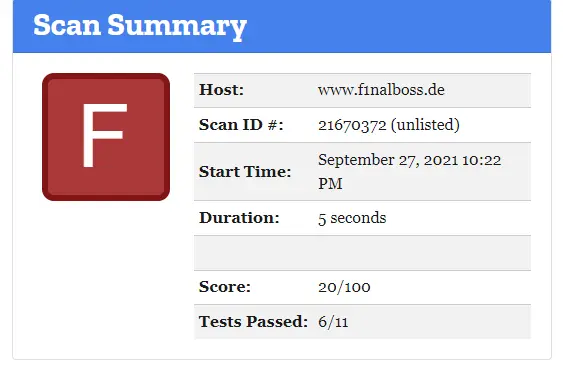
I ran a check for my site and got the following result:
||
|:--:|
| *First test on Mozilla Observatory with the result: F*|
After quick research at [traefik documentation](https://doc.traefik.io/traefik/v2.0/middlewares/headers/), I came up with these important headers which I want to implement in my environment:
```bash
accesscontrolallowmethods=GET, OPTIONS, PUT, POST, PATCH
accesscontrolmaxage=100
addvaryheader-true
hostsproxyheaders=X-Forwarded-Host
sslredirect=true
X-Forwarded-Proto=https
stsseconds=63072000
stsincludesubdomains=true
stspreload=true
forcestsheader=true
framedeny=true
contenttypenosniff=true
browserxssfilter=true
referrerpolicy=same-origin
featurepolicy=camera 'none'; geolocation 'none'; microphone 'none'; payment 'none'; usb 'none'; vr 'none';
customresponseheaders.X-Robots-Tag=none,noarchive,nosnippet,notranslate,noimageindex,
```
To add these headers in my traefik installation I added a new middleware to my traefik docker-compose.yml:
```yaml
[...]
- traefik.http.middlewares.security-headers.headers.accesscontrolallowmethods=GET, OPTIONS, PUT
- traefik.http.middlewares.security-headers.headers.accesscontrolmaxage=100
- traefik.http.middlewares.security-headers.headers.addvaryheader=true
- traefik.http.middlewares.security-headers.headers.hostsproxyheaders=X-Forwarded-Host
- traefik.http.middlewares.security-headers.headers.sslredirect=true
- traefik.http.middlewares.security-headers.headers.sslproxyheaders.X-Forwarded-Proto=https
- traefik.http.middlewares.security-headers.headers.stsseconds=63072000
- traefik.http.middlewares.security-headers.headers.stsincludesubdomains=true
- traefik.http.middlewares.security-headers.headers.stspreload=true
- traefik.http.middlewares.security-headers.headers.forcestsheader=true
- traefik.http.middlewares.security-headers.headers.framedeny=true
- traefik.http.middlewares.security-headers.headers.contenttypenosniff=true
- traefik.http.middlewares.security-headers.headers.browserxssfilter=true
- traefik.http.middlewares.security-headers.headers.referrerpolicy=same-origin
- traefik.http.middlewares.security-headers.headers.featurepolicy=camera 'none'; geolocation 'none'; microphone 'none'; payment 'none'; usb 'none'; vr 'none';
- traefik.http.middlewares.security-headers.headers.customresponseheaders.X-Robots-Tag=none,noarchive,nosnippet,notranslate,noimageindex
[...]
```
After adding this middleware I updated my traefik service that runs within a Docker Swarm (cf. [this article](https://www.paulsblog.dev/services-you-want-to-have-in-a-swarm-environment/))
```bash
docker stack deploy -c docker-compose.traefik.yml traefik
```
This addition made it possible to use this middleware within every service deployed to my swarm and managed by traefik. To do this I had to add the following line to the ****labels section**** within the docker-compose.yml:
```yaml
[...]
- traefik.http.routers.simpleweb-https.middlewares=security-headers
[...]
```
After restarting the simpleweb service I ran another test and got a B score because of this error:
||
|:--:|
| *Content Security Policy Error on Mozilla Observatory*|
I researched and found the correct traefik header for CSP. Additionally, I created a very strict CSP directive and added it to the header value:
```yaml
contentsecuritypolicy=default-src 'none'; img-src 'self' https://i.postimg.cc; script-src 'self'; style-src 'self'"
```
I exclusively allow access to [https://i.postimg.cc](https://i.postimg.cc/) for img-src because the only picture I use at [https://ftp.f1nalboss.de](https://ftp.f1nalboss.de/) is hosted there.
Because this header is very strict I did ****not create a global middleware**** for it. I upgraded the service in which I want to use this CSP directive by adding this line to the simpleweb service and adjusting the middleware:
```yaml
[...]
- traefik.http.routers.simpleweb-https.middlewares=security-headers, simpleweb-csp
- traefik.http.middlewares.simpleweb-csp.headers.contentsecuritypolicy=default-src 'none'; img-src 'self' https://i.postimg.cc; script-src 'self'; style-src 'self'
[...]
```
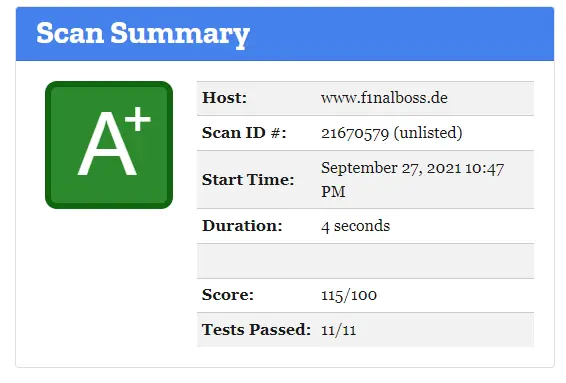
I restarted the service and ran another check to finally achieve an A+!
||
|:--:|
| *The final result on Mozilla Observatory after using security headers in Traefik; result: A+*|
How I Harden My Website
-----------------------
Because I also want to **harden** my server I ran a check at [hardenize.com](https://www.hardenize.com/) and got non-satisfying results for **TLS** and **HSTS**.
Due to already having adjusted the traefik headers for HSTS beforehand, the only thing left to do was submit my domain name at [hstspreload](https://hstspreload.org/) to fix the ****HSTS**** issue.
**THIS PART IS VERY IMPORTANT:** If you want to submit your website to **hstspreload.org** think about it very carefully. There can be problems if you cannot fulfill everything: [read here for information](https://hstspreload.org/#opt-in)
Solving the **TLS** issue was more involved. I had to adjust the traefik configuration so that the minimum version of TLS is 1.2 and **NOT** 1.0, as is the default. To set a minimum **TLS** version I added a file provider to my traefik installation within the command section of my traefik docker-compose.yml:
```yaml
command:
- --providers.docker
[...]
- --providers.file.directory=/configuration/
- --providers.file.watch=true
```
Then I created a new configuration file (called tls.toml) which contains an entry ****\[tls-options\]**** and should be used to set the minimum TLS version to 1.2. Additionally, I added excellent cipher suites ([read this to know about cipher suites](https://www.thesslstore.com/blog/cipher-suites-algorithms-security-settings/)).
```yaml
[tls.options]
[tls.options.mintls12]
minVersion = "VersionTLS12"
cipherSuites = [
"TLS_ECDHE_RSA_WITH_AES_128_GCM_SHA256",
"TLS_ECDHE_RSA_WITH_AES_256_GCM_SHA384",
"TLS_ECDHE_RSA_WITH_CHACHA20_POLY1305",
"TLS_AES_128_GCM_SHA256",
"TLS_AES_256_GCM_SHA384",
"TLS_CHACHA20_POLY1305_SHA256"
]
sniStrict = true
```
This configuration guarantees that traefik will use at least TLS 1.2 with the provided cipher suites. I chose these six cipher suites because I want to have three for TLS 1.2 and three for TLS 1.3 which are declared safe!
I saved the file within the ./configuration/ folder and updated the volume section within the traefik docker-compose.yml:
```yaml
volumes:
[...]
- ./configuration:/configuration
```
After that, I restarted the traefik instance.
The last step was activating the min TLS version within the simpleweb service by adding a new label:
```yaml
[...]
- traefik.http.routers.simpleweb-https.tls.options=mintls12@file
[...]
```
After a restart of the simpleweb service I retried the test on **Hardenize** and **Mozilla** and got the wanted results:
* [https://www.hardenize.com/report/f1nalboss.de/1628027450](https://www.hardenize.com/report/f1nalboss.de/1628027450)
* [https://observatory.mozilla.org/analyze/ftp.f1nalboss.de](https://observatory.mozilla.org/analyze/ftp.f1nalboss.de)
There is also an informative test at [ssl-labs](https://www.ssllabs.com/ssltest) which checks certificates. With the new configuration, I also got an **A+**
* [https://www.ssllabs.com/ssltest/analyze.html?d=ftp.f1nalboss.de](https://www.ssllabs.com/ssltest/analyze.html?d=ftp.f1nalboss.de)
Closing Notes
-------------
To simplify everything you can use [this docker-compose.yml](https://ftp.f1nalboss.de/data/docker-compose.simpleweb.example.yml) and run it within any Docker Swarm as www-stack service:
```bash
docker stack deploy -c docker-compose-simpleweb.example.yml www-stack
```
I hope you find this tutorial helpful and are now able to secure your website and increase trust by adding security headers and optimizing SSL usage.
I would love to hear your ideas and thoughts. If you already run a traefik installation and use different headers/middleware or you have other cipher suites please comment here and explain. Also, if you have any questions, please jot them down below. I try to answer them if possible.
This article was originally published on my blog at [https://www.paulsblog.dev/harden-your-website-with-traefik-and-security-headers/](https://www.paulsblog.dev/harden-your-website-with-traefik-and-security-headers/)
Feel free to connect with me on [my personal blog](https://www.paulsblog.dev), [Medium](https://medium.knulst.de), [LinkedIn](https://www.linkedin.com/in/paulknulst/), [Twitter](https://twitter.com/paulknulst), and [GitHub](https://github.com/paulknulst).
* * *
Did you find this article valuable? Want to support the author? (... and support development of current and future tutorials!). You can sponsor me on [Buy Me a Coffee](https://buymeacoffee.com/paulknulst) or [Ko-Fi](https://ko-fi.com/paulknulst). Furthermore, you can become a free or paid member by [signing up to my website](https://www.paulsblog.dev/#/portal). See the [contribute page](https://www.paulsblog.dev/contribute/) for all (free or paid) ways to say thank you!
* * *
Photo by [Peter Conrad](https://unsplash.com/@pconrad?utm_source=unsplash&utm_medium=referral&utm_content=creditCopyText) / [Unsplash](https://unsplash.com/@pconrad?utm_source=unsplash&utm_medium=referral&utm_content=creditCopyText)